A wonderful video about how inspiring teachers can change young lives:
Sunday, August 22, 2010


Wednesday, August 18, 2010
Exciting Mahara news

Out this week from the Mahara community: two new features that should prove extremely popular with e-portfolio users:
- Collections: a handy way of grouping a number of pages together and providing a way of navigating through them. Think of having three separate pages for the different phases of a project: proposal, progress and product. Or of having a different view for each subject you are learning. Collections are also a way to give the same access to a number of views at once.
- Plans: "Plans are essentially task lists that allow you to formulate a goal (the plan) and spell out the individual steps (the tasks) you need to take – optionally by a certain date – to reach your goal."
Friday, August 13, 2010
...and now Oracle's doing it.
News today that Oracle is suing Google over its use of Java in the Android operating system. Possibly something to do with the fact that Google has surpassed Apple in phone os market share. You might have guessed that I'm pretty cynical about this: software patents are simply another revenue stream.
The interweb's running hot with some pretty angry anti-Oracle feeling at the moment...
The interweb's running hot with some pretty angry anti-Oracle feeling at the moment...
Thursday, August 12, 2010
Apple patents the work of others
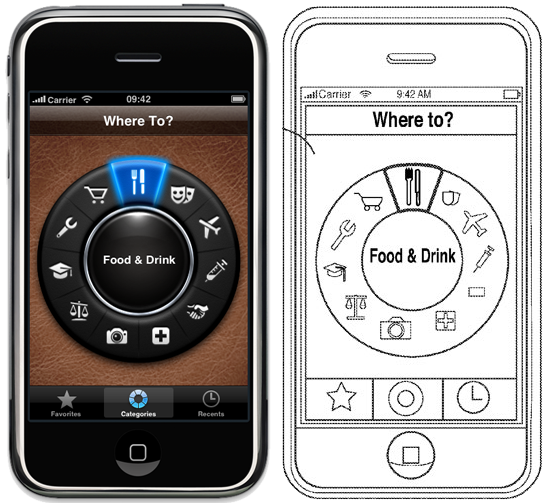
A cautionary tale: Ortwin Gentz is a software developer whose company Futuretap has been extremely successful building apps for iPhone and iPad. Imagine Ortwin's surprise when he discovered that the company that has allowed him to earn a living has actually patented part of his work. A screenshot of Ortwin's 'Whereto' app actually features in Apple's patent claim.

It strikes me that there are two bad things here: i) software patents in themselves, and ii) any one company controlling a lot of the technology we use. If this were ever to happen on the Android platform, consumers would be free to go elsewhere. Not so with Apple.
It strikes me that there are two bad things here: i) software patents in themselves, and ii) any one company controlling a lot of the technology we use. If this were ever to happen on the Android platform, consumers would be free to go elsewhere. Not so with Apple.
Wednesday, July 28, 2010
The Big Blue Button- free webinar platform
Hat tip to Don Christie for bringing this to my attention: http://bigbluebutton.org/overview
The big blue button is a collection of 14 different open source tools that allow teachers and learners to collaborate in online classes. It features video and audio conferencing, application sharing and chat. From what I've seen, it's absolutely amazing. I'll get some of our students to install it so we can have a play.

The big blue button is a collection of 14 different open source tools that allow teachers and learners to collaborate in online classes. It features video and audio conferencing, application sharing and chat. From what I've seen, it's absolutely amazing. I'll get some of our students to install it so we can have a play.

Thursday, July 22, 2010
The iPad launches today in NZ
This just in: Apple unveils a new feature in its stores: The Friend Bar.
New Apple Friend Bar Gives Customers Someone To Talk At About Mac Products
While a lot of people are buzzing about this device being the next big thing, I'm a bit more hesitant. As Tim Lee says, moving to more of a closed, locked down operating system, seems to go against the current trends in computing. (RMS calls it the iBad).
I still prefer the Dell Streak for the fact that it runs Android.
New Apple Friend Bar Gives Customers Someone To Talk At About Mac Products
While a lot of people are buzzing about this device being the next big thing, I'm a bit more hesitant. As Tim Lee says, moving to more of a closed, locked down operating system, seems to go against the current trends in computing. (RMS calls it the iBad).
I still prefer the Dell Streak for the fact that it runs Android.
Saturday, July 10, 2010
Moodle 2.0 - conditional activities
Moodle 2.0 has been a long time coming: it's been two years in development, 70% of the code has been re-written and some great new features have been added.
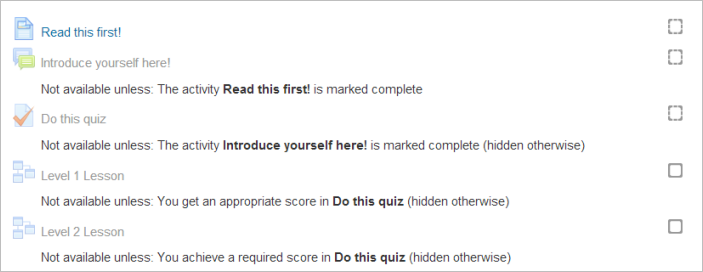
One of the most transformational is what they're calling 'conditional activities'. There has been a bit of debate over whether conditional activities should be added to Moodle because some believe that every student should have access to all learning activities at all times (a viewpoint that has considerable merit) but I'm in favour of conditional activities because it gives educators the ability to reconfigure the learning management system depending on the needs of the learner. In short: Moodle becomes a personalised learning environment.
Image a situation whereby a student gets 100% in the diagnostic assessment at the start of a unit of work, while another gets 20%. These two students need dramatically different pathways through the topic ahead, but traditionally they have had the same materials available to them from this point on. Using conditional activities, a teacher could say "If a student receives 80% or higher in this quiz, then reveal to them these further activities, but if a student receives 20% or lower, allow them to see these activities..." Teachers can set any criteria they like around turning these activities on or off, but used well, this has the power to put the right learning activity in front of the right learner at just the right time. I can't wait to start using them with my students...

One of the most transformational is what they're calling 'conditional activities'. There has been a bit of debate over whether conditional activities should be added to Moodle because some believe that every student should have access to all learning activities at all times (a viewpoint that has considerable merit) but I'm in favour of conditional activities because it gives educators the ability to reconfigure the learning management system depending on the needs of the learner. In short: Moodle becomes a personalised learning environment.
Image a situation whereby a student gets 100% in the diagnostic assessment at the start of a unit of work, while another gets 20%. These two students need dramatically different pathways through the topic ahead, but traditionally they have had the same materials available to them from this point on. Using conditional activities, a teacher could say "If a student receives 80% or higher in this quiz, then reveal to them these further activities, but if a student receives 20% or lower, allow them to see these activities..." Teachers can set any criteria they like around turning these activities on or off, but used well, this has the power to put the right learning activity in front of the right learner at just the right time. I can't wait to start using them with my students...
Subscribe to:
Posts (Atom)