Showing posts with label Science. Show all posts

Tuesday, October 22, 2013

Dia | Diagram editor

Dia is roughly inspired by the commercial Windows program 'Visio,' though more geared towards informal diagrams for casual use. It can be used to draw many different kinds of diagrams. It currently has special objects to help draw entity relationship diagrams, UML diagrams, flowcharts, network diagrams, and many other diagrams. It is also possible to add support for new shapes by writing simple XML files, using a subset of SVG to draw the shape.

It can load and save diagrams to a custom XML format (gzipped by default, to save space), can export diagrams to a number of formats, including EPS, SVG, XFIG, WMF and PNG, and can print diagrams (including ones that span multiple pages).

Wednesday, October 2, 2013

Stellarium | Stars, Planets, Constellations

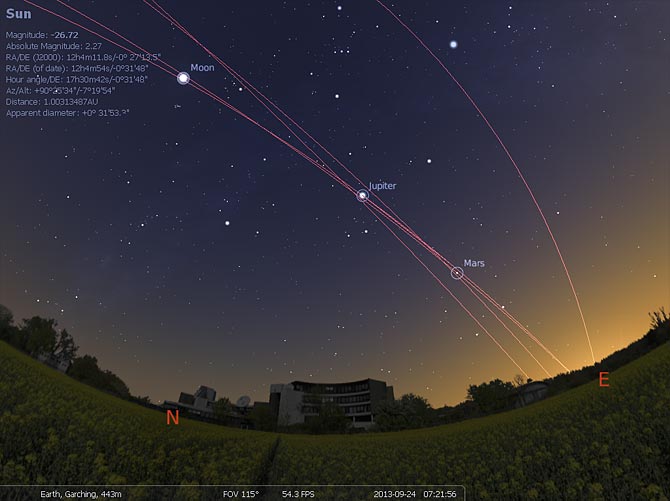
Stellarium allows you to place yourself anywhere in the world to watch the constellations travel across the sky above. Stellarium also allows you to pause, fast-forward or rewind time to see what the stars do. (Link)

There are some very cool videos on youtube that showcase what it can do:

Thursday, September 26, 2013

Celestia | Explore the universe

"The free space simulation that lets you explore our universe in three dimensions. Celestia runs on Windows, Linux, and Mac OS X.
  • Unlike most planetarium software, Celestia doesn't confine you to the surface of the Earth. You can travel throughout the solar system, to any of over 100,000 stars, or even beyond the galaxy.
  • All movement in Celestia is seamless; the exponential zoom feature lets you explore space across a huge range of scales, from galaxy clusters down to spacecraft only a few meters across. A 'point-and-goto' interface makes it simple to navigate through the universe to the object you want to visit.
  • Celestia is expandable. Celestia comes with a large catalog of stars, galaxies, planets, moons, asteroids, comets, and spacecraft. If that's not enough, you can download dozens of easy to install add-ons with more objects." (Link)

Wednesday, September 18, 2013

Flashcards | Anki

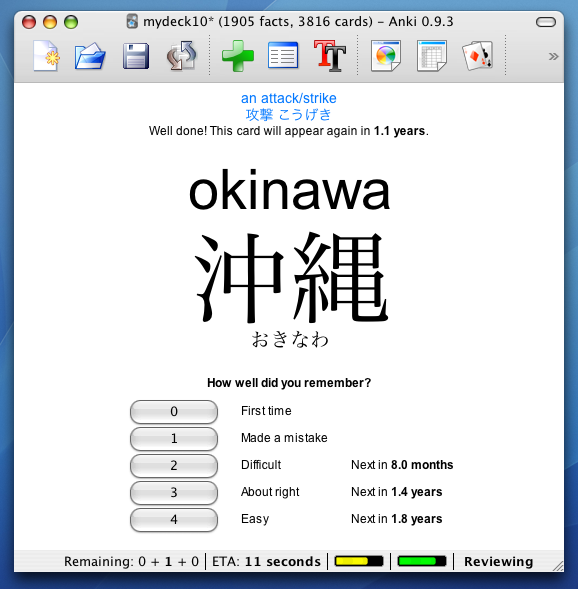
"Anki is a program which makes remembering things easy. Because it's a lot more efficient than traditional study methods, you can either greatly decrease your time spent studying, or greatly increase the amount you learn.
Anyone who needs to remember things in their daily life can benefit from Anki. Since it is content-agnostic and supports images, audio, videos and scientific markup (via LaTeX), the possibilities are endless.
For example:
  • Learning a language
  • Studying for medical and law exams
  • Memorizing people's names and faces
  • Brushing up on geography
  • Mastering long poems
  • Even practicing guitar chords!"

Tuesday, July 10, 2012

Virtual Electron Microscope

"The Virtual Microscope is a NASA-funded project that provides simulated scientific instrumentation for students and researchers worldwide as part of NASA's Virtual Laboratory initiative. This site serves as home base for theImaging Technology Group's contributions to that project—namely virtual microscopes and the multi-dimensional, high-resolution image datasets they view. Currently we provide 90 samples totaling over 62 gigapixels of image data. The Virtual Microscope, which is available for free downloadsupports functionality from electron, light, and scanning probe microscopes, datasets for these instruments, training materials to learn more about microscopy, and other related tools. The project is open source and the code is available on Sourceforge."

http://virtual.itg.uiuc.edu/

Tuesday, December 20, 2011

EDvent Calendar: Day 21 (The final frontier)

If your students like exploring the infinity of space, introduce them to these three programmes. All open source and free for everyone to install.
Stellarium
1. Stellarium... "is a free open source planetarium for your computer. It shows a realistic sky in 3D, just like what you see with the naked eye, binoculars or a telescope.It is being used in planetarium projectors. Just set your coordinates and go." Available for Windows/Mac/Linux.

Celestia
2. Celestia. The free space simulation that lets you explore our universe in three dimensions. Unlike most planetarium software, Celestia doesn't confine you to the surface of the Earth. You can travel throughout the solar system, to any of over 100,000 stars, or even beyond the galaxy. Available for Windows/Mac/Linux.

3. Virtual Moon Atlas. "Software for Moon observation and survey. Let you visualize the real Moon aspect at every time. Also help to study any lunar formations using feature database and pictures library" Available for Windows/Mac/Linux.

To infinity and beyond.

Saturday, July 30, 2011

World Wind: Open Source Google Earth?


World Wind is by no means as full-featured as Google Earth, but if you just want to play Atlas and spin the world around, it's a good option. To install under Linux, look for worldwind in the software channels, but the java version of the software runs on any platform. Best thing about it is that the software is open source and the imagery is not owned and copyrighted by [insert giant corporation here]. There are some nice Java webstart demos here too: http://worldwind.arc.nasa.gov/java/demos/ showing things like loading .kml files, mapping elevations, annotations, geo-mapped photos, earthquake information etc.

Sunday, July 24, 2011

Hold the world in the palm of your hand

One of the winners at last year's New Zealand Open Source Awards was Ghosts in the Form of Gifts by Bronwyn Holloway-Smith.
This project used Open Source machines - the RepRap - to recreate physical artefacts from Te Papa that had been lost or destroyed over the years. The finished files for the artefacts were released under a Creative Commons licence so that anyone who wished to could create their own exhibits. Most of these represented items of significance to Pacific cultures.

Wouldn't it be great to be able to use public domain 3D models like these with students wherever and whenever we liked? Of course. Enter AndAR, which stands for Android Augmented Reality. This app allows anyone with an Android phone to download 3D model files and, using a black and white printed marker, use Augmented Reality to view and interact with those models. It's hard to explain just how it works, so here's a video, using one of the stock 3D models that come with the app:
See what I mean?
And as Bronwyn has very thoughtfully made her models available under a CC-BY-SA licence, anyone can download a copy of a file and use it within AndAR. So if you need to play around with an adze, a sperm whale tooth or even a giant land snail shell, now you can.

Monday, June 20, 2011

Four cool tools for studying astronomy

Two of my favourite applications when it comes to studying the stars are Celestia and Stellarium. The former allows one to fly through the solar system following planets, asteroids or satellites, while the latter allows one to place oneself anywhere in the world to watch the constellations travel across the sky above. Stellarium also allows one to pause, fast-forward or rewind time to see what the starts do. There are some very cool videos on youtube that showcase what these two programmes can do:
There is also an increasing number of applications for Android that help people learn more about the night sky while standing in their front yard as well. Google Sky Map is great. If you want to find where Mars is, type in Mars and it will point an arrow in the right direction until you find it (video). Satellite AR is something I've only just discovered but it is no less impressive. It uses augmented reality to overlay the night sky with images and trajectories of satellites passing overhead. Here's a demo of it in action: