Showing posts with label free software. Show all posts

Wednesday, October 17, 2012

Graphics App ‘Pinta’ Updates, Brings Improved Tools, Layer Blending

Graphics App ‘Pinta’ Updates, Brings Improved Tools, Layer Blending:
A new release of graphics app Pinta has been made available for download.

Version 1.4 of the simple drawing tool sees a number of new features and improvements made, along with fixes for various bug and performance issues.


To read the rest of this article visit http://omgubuntu.co.uk

Thursday, July 12, 2012

Open Source GIS Software

Actually there is a ton of free GIS software out there, but I've found QGIS to be the best of the bunch:

"Quantum GIS (QGIS) is a powerful and user friendly Open Source Geographic Information System (GIS) that runs on Linux, Unix, Mac OSX, Windows and Android. QGIS supports vector, raster, and database formats. QGIS is licensed under the GNU Public License. "

Features:
  • Direct viewing of vector and raster data in different formats and projections. Supported formats include: 
  • Mapping and interactive exploration of spatial data. Tools include: 
  • Create, edit and export spatial data 
  • Perform spatial analysis,  
  • Publish your map on the internet using QGIS Server or the "Export to Mapfile" capability (requires UMN MapServer
  • Adapt QGIS to your needs through the extensible plugin architecture.

Tuesday, July 10, 2012

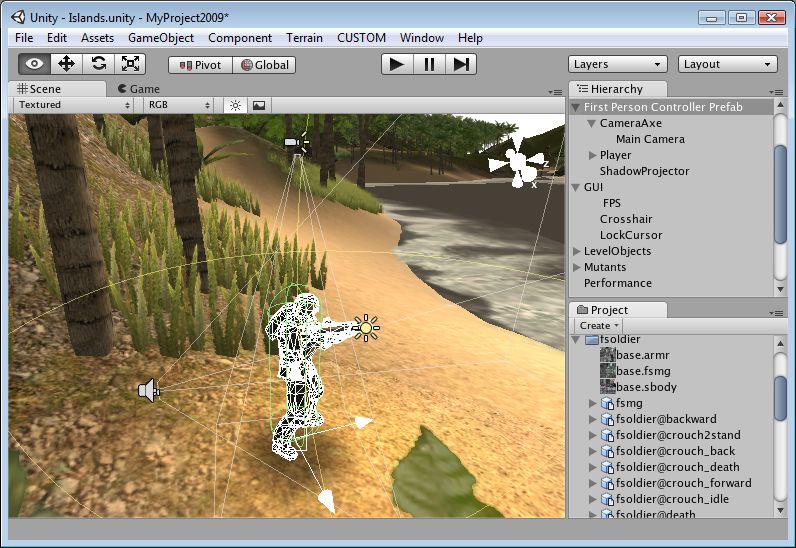
Unity3D embraces Linux

Each Wednesday at our school students get to choose what they study. It's called an impact project and students work with teachers and mentors from the community to learn deeply and make the world a better place. Our school's contribution to the world is to help students see opportunities, innovate, be creative and become entrepreneurs. It's an awesome day to be a teachers and it's equally awesome to see what students are capable of when they are put in charge of their own learning.

A lot of students choose to build their own computer games, and a lot of them use Unity3D as their game development engine. It's an awesome open source engine that helps developers get up and running quickly. So I was pretty excited to see that the next release will export native Linux games: http://unity3d.com/?overview

So, yeah, I'm pretty excited.

Virtual Electron Microscope

"The Virtual Microscope is a NASA-funded project that provides simulated scientific instrumentation for students and researchers worldwide as part of NASA's Virtual Laboratory initiative. This site serves as home base for theImaging Technology Group's contributions to that project—namely virtual microscopes and the multi-dimensional, high-resolution image datasets they view. Currently we provide 90 samples totaling over 62 gigapixels of image data. The Virtual Microscope, which is available for free downloadsupports functionality from electron, light, and scanning probe microscopes, datasets for these instruments, training materials to learn more about microscopy, and other related tools. The project is open source and the code is available on Sourceforge."

http://virtual.itg.uiuc.edu/

Sunday, July 8, 2012

How safe are your blueprints?

James Bond and Knight rider might have had to resort to using tiny cameras to take photos of secret blueprints, but it seems today's data thieves don't need to go to such lengths. There are reports of a virus spreading through installations of AutoCAD that is sending sensitive data to email addresses in China.

Free software has fewer viruses, partly because everyone can see the code (warts and all) so everyone can spot potential security breaches. Sadly if you keep your code hidden from your users, you're really just helping writers of viruses do their work.

If you're worried about the security of your CAD data, use something open source like Draftsight.

Tuesday, July 3, 2012

Free is better, even when you can pay...

I spotted this little fairytale on Wes Fryer's blog recently. It's a tale of learning, budgetary constraints and the triumph of free software.

Sunday, July 1, 2012

Your imagination + Arduino = Anything

Here's Massimo Banzi's TED talk on Arduinos. It's a wonderful talk for anyone who has an imagination and a desire to do cool things with technology.

Some of the projects he mentions are:

  • An RFID-powered cat feeder to make sure Fido doesn't eat Felix's food.
  • A quadcopter powered by Arduino
  • A TV that mutes itself when Kim Kardasian comes on.
  • New musical instruments
  • A glove that interprets sign-language and prints the message the signer is signing.
  • A PS3 interface that allows children with limited movement to play games
  • Plants that tweet, and even...
  • A chair that tweet when someone farts.


Description:
"Massimo Banzi helped invent the Arduino, a tiny, easy-to-use open-source microcontroller that's inspired thousands of people around the world to make the coolest things they can imagine -- from toys to satellite gear. Because, as he says, "You don't need anyone's permission to make something great." "

Tuesday, June 12, 2012

Open Source Video Editing

This year promises to be a big year for open source video editors. For a long time open source video editing has been the poor cousin to graphic design's Gimp, Scribus and Inkscape, but that's about to change. Firstly Lightworks is currently available in beta for Windows with OSX and Linux versions coming soon:
"Lightworks is the fastest, most accessible and focused NLE in the industry, because it is based on the simple idea that the editor, not the computer industry, knows what’s best. The latest release of Lightworks is based on the cumulative knowledge from twenty years of top-flight editing.

At the same time,, the Ubuntu version of Novacut has just been released. The quantum leap that Novacut makes is that it offers realtime collaboration. This feature alone has the potential to completely change the way we think about editing. As Christie Strong says on the Novacut blog:
"Novacut is not just a video editor, it's a revolution. An open source, collaborative, cloud-enabled platform that is created by artists for artists. The ambitiousness of the project, the passion of it's team and their commitment to the filmmaking community inspires me. They are thinking about the entire pre- to post-production pipeline and designing tools that empower storytellers and support the creative process from the ground up. If this is the future of filmmaking, sign me up!"
http://blog.novacut.com/

In addition to these heavyweights, there are always the old faithfuls: Openshotvideo and PiTiVi

Sunday, June 10, 2012

Open software behind open science

This article on Tech dirt (via Glyn Moody) has a good exploration of the importance of open source software to the open science movement:

"Although the traditional image of a science laboratory typically consists of a room full of test tubes or microscopes, the reality is that computers now play a central role there, just as they do for business and life in general.

Computers need software, and some of that software will be specially written or adapted from existing code to meet the particular needs of the scientists' work. This makes computer software a vital component of the scientific process. It also means that being able to check that code for errors is as important as being able to check the rest of the experiment's methodology. And yet very rarely can other scientists do that, because the code employed is not made available."

Monday, May 7, 2012

Free software; free society

I was lucky enough to catch this interview between RadioNZ's Katherine Ryan and Enrique Penalosa, Colombian politician, and former mayor of Bogota responsible for major changes to the city's transport infrastructure, including a bike paths network and the TranMilenio mass transit system. The thing that struck me most about the interview was how deeply his views on transit issues were grounded in a very clear vision of what democracy is. He says in the interview that transport is as much an issue of democracy as anything: the person riding a $300 bicycle should never feel that they are less important to the city (or the nation) as the person driving the $30,000 car. It's a great point and it got me thinking a lot.

It struck me that there is a lot of crossover between what Penalosa believes and what people like RMS believe when it comes to software: no person should feel less important than another because of the way they use technology. Access to education is seen as a human right in most countries, and I would argue that access to digital tools is equally important, if not essential for democracy to thrive. If the software required to educate, innovate, communicate, empower and transform are solely the preserve of those who can afford them, then I think we have a serious problem ahead of us, and it's a problem that goes well beyond technology. It's a problem, not just of widening gaps between the haves and the have nots, it's a problem that strikes at the democratic belief that all people are equal. The larger the inequality, the larger the underclass (the 'digitally poor'), the less we can say we truly believe in the ideal of equality for all.

On a practical level, there are two sides to the problem of access: hardware and software. It's no good having software if you have no computer to run it on, and vice versa. But if the local public library or a friend with a computer can solve the issue of hardware, that only leaves software. How do we make available to all citizens the tools to create, innovate, investigate, research, convince and communicate? Well, it's difficult with proprietary tools. Let's imagine that you are without a computer, but you want to learn more about a particular topic or (even better) build something that demonstrates your understanding of that topic. If a friend loans you their laptop so you can use the proprietary software installed on it, they have most likely breached their software licence agreement. They've definitely breached it if they want to continue to use software themselves. You and your friend are in a tricky situation: your software licence agreements are standing in the way of your friendship.

There is an alternative of course, and it's one that readers of this blog will be familiar with: free software. Users of free software are never constrained by licence agreements that restrict their ability to share that software, in fact they are empowered by the GPL to share. Free software is one of the great democratising powers in our society: it means that everyone, no matter who they are, where they come from or what their financial means, can participate in our society and contribute in a way that is unique to them. It's something I deeply believe in.

Here's RMS performing the software freedom song. I include it here for no reason other than I love it.
 

Tuesday, December 20, 2011

EDvent Calendar: Day 21 (The final frontier)

If your students like exploring the infinity of space, introduce them to these three programmes. All open source and free for everyone to install.
Stellarium
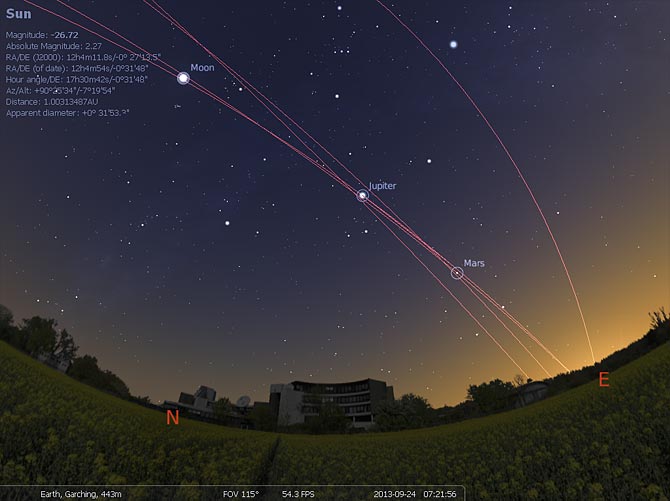
1. Stellarium... "is a free open source planetarium for your computer. It shows a realistic sky in 3D, just like what you see with the naked eye, binoculars or a telescope.It is being used in planetarium projectors. Just set your coordinates and go." Available for Windows/Mac/Linux.

Celestia
2. Celestia. The free space simulation that lets you explore our universe in three dimensions. Unlike most planetarium software, Celestia doesn't confine you to the surface of the Earth. You can travel throughout the solar system, to any of over 100,000 stars, or even beyond the galaxy. Available for Windows/Mac/Linux.

3. Virtual Moon Atlas. "Software for Moon observation and survey. Let you visualize the real Moon aspect at every time. Also help to study any lunar formations using feature database and pictures library" Available for Windows/Mac/Linux.

To infinity and beyond.

Sunday, December 18, 2011

EDvent Calendar: Day 19 (Safe social)

If Twitter gives you the Facebooks, here are a few safe ways to use Social Networks.
1. Edmodo is a Facebook-style site that is secure and operates a lot like a closed class space. My friend Tara T-J uses it with her classes but I don't have a lot of experience with it. "Edmodo provides a safe and easy way for your class to connect and collaborate, share content, and access homework, grades and school notices. Our goal is to help educators harness the power of social media to customize the classroom for each and every learner."

2. Status.net allows anyone to set up their own micro-blogging site. It's a really safe, secure way to allow organisations to tap into the power of micro-blogging for internal communication, micro-reflection, questions and answers, out of hours discussions etc. It's great and we use it at our school.

Face book
3. Diaspora is not the new Facebook. It's not even the old Facebook, but it is a project that has the potential to become very useful to schools as sites like Facebook create impenetrable walled gardens within the web. Tim Berners-Lee says
"Facebook, LinkedIn, Friendster and others typically provide value by capturing information as you enter it: your birthday, your e-mail address, your likes, and links indicating who is friends with whom and who is in which photograph...[but] once you enter your data into one of these services, you cannot easily use them on another site."
But Diaspora is different. It's completely free software, which means you can install the code wherever you want and retain ownership of your data. Right from the very start of the project, users have had the ability to remove their data and permanently delete it, unlike Facebook which makes it difficult to do this. Many schools and universities are wary of using Facebook to create communities around courses because all of the content they upload to Facebook can be used, modified or even sublicensed by Facebook in every possible way – even if they quit the service. It goes without saying that setting up your own internal Diaspora* server ensures you retain ownership of content long term. You can even link your account to Facebook if you really want to, which means you're posting into both environments at once.


Wednesday, October 26, 2011

Open source collaborative video editing

As December gets closer, I'm getting excited about this beauty landing in my stocking. For a long time, video editing has been less than spectacular on Linux, but with the release of Lightworks in December, that's about to change. A previously proprietary application, on which The King's Speech, Martin Scorsese's The Departed, Mission Impossible, Pulp Fiction, Braveheart and Batman were edited, Lightworks is a stunning product that is being open sourced. It's not for beginners, but if you know what you're doing this will have you nominated for the best picture category in no time.


As well as offering all of the features one would expect from a non-linear video editor, "Multiple users can work on the same Lightworks Project at the same time, collaborating on edits with fast, intuitive user permission controls." This is the real potential of video editing and something that is long overdue. Linux release 19th December 2011

http://www.lightworksbeta.com/

Thursday, September 8, 2011

SlowMo Video

Saw this over at OMG! Ubuntu:
SlowMoVideo might just be my favourite video-manipulation tool available for Linux: the effects it can create from even the simplest of footage is amazing.
Hyperbole over, on to the facts.
SlowMoVideo is a Qt4 application designed for intelligently slowing down video clips.
Rather than achieve this by ’time stretching’ your footage, as most video editors do, SlowMoVideo allows you to “smoothly slow down and speed up your footage” with the option to apply motion blur for an added fluidity of image.

Friday, September 2, 2011

Virtual Moon Atlas

Google Moon is a great tool for exploring our closest celestial neighbour but there are a few shortcomings with it. Like anything to do with Google, it will only exist as long as Google has the energy and inclination to continue with it. One of the reasons I like to use free software is that under the GPL all the code is released to the world and can never be rescinded. Even if a project is abandoned, it won't ever disappear because hundreds, thousands or millions of people will have the source code. So I'm always looking to alternatives to products like Google Earth (Worldwind for instance) and Google Moon, which is where Virtual Moon Atlas comes in. It's available for Windows, Mac and Linux and is open source. You can use it to explore and discover, but also to say 'take me to the Sea of Tranquility." The other great thing about free software is that anyone (particularly students) can screen capture the software without breaching copyright. Wouldn't it be great for students to use something like RecordMyDesktop to film a virtual tour of the Apollo missions using software like this.

Friday, August 12, 2011

Video conversion tools

My knowledge of video types and codecs has been hard-fought. I'm certainly no expert but I do know my containers from my bitrates and my framerates. Sadly it's not always easy for people to quickly resize a video or convert from one form to another without knowing more than you need to about variable bitrates or HD. To the rescue come a range of different open source video conversion tools:

  • Avidemux: gives you the best of both worlds with the ability to control bitrates, codecs, filters and so on, but also has a handy 'Auto > ' feature that automates the creation of video for things like Youtube, iPod, DVD etc.

  • Arista Transcoder:
  • The best, easiest to use transcoder I've seen. Presets take the hard work out of conversion, and there are a lot of presets.
  • PiTiVi: this is a video editor that also supports exporting to a range of different file formats. Easy to use trim feature, transitions and effects and pretty simple export at the end of the process too.

While we're at it, can I also say how impressed I am with Google's open source video codec called webm? Try it for yourself with Arista: convert a large DVD quality file to webm and see what a difference it makes. I've had file size savings of up to 90%.

Saturday, August 6, 2011

Open Source Physics: Tracker

I discovered this neat tool when learning about the physics of Angry Birds. Not only does Tracker identify and track objects frame-by-frame through a video, it also records and graphs this data for you. It comes with quite a few experiments installed and, in the hands of a good Physics teacher, would form the centre of a very interactive unit on motion and movement. I can imagine students the world around grabbing their cellphones to record video of all manner of objects 'bouncing'. Hmmm. Does my glass of chocolate milk fall at the same rate as a bowl of noodles?
It's an easy-to-use tool that allows students to become better askers of questions and designers of experiments instead of becoming better memorisers of someone else's data.

Saturday, July 30, 2011

World Wind: Open Source Google Earth?


World Wind is by no means as full-featured as Google Earth, but if you just want to play Atlas and spin the world around, it's a good option. To install under Linux, look for worldwind in the software channels, but the java version of the software runs on any platform. Best thing about it is that the software is open source and the imagery is not owned and copyrighted by [insert giant corporation here]. There are some nice Java webstart demos here too: http://worldwind.arc.nasa.gov/java/demos/ showing things like loading .kml files, mapping elevations, annotations, geo-mapped photos, earthquake information etc.

Monday, June 20, 2011

Four cool tools for studying astronomy

Two of my favourite applications when it comes to studying the stars are Celestia and Stellarium. The former allows one to fly through the solar system following planets, asteroids or satellites, while the latter allows one to place oneself anywhere in the world to watch the constellations travel across the sky above. Stellarium also allows one to pause, fast-forward or rewind time to see what the starts do. There are some very cool videos on youtube that showcase what these two programmes can do:
There is also an increasing number of applications for Android that help people learn more about the night sky while standing in their front yard as well. Google Sky Map is great. If you want to find where Mars is, type in Mars and it will point an arrow in the right direction until you find it (video). Satellite AR is something I've only just discovered but it is no less impressive. It uses augmented reality to overlay the night sky with images and trajectories of satellites passing overhead. Here's a demo of it in action:

Thursday, May 26, 2011

Digikam: photo management made easy


I'm a big fan of Picasa. My only quibble with it is that it's not open and is another way for Google to own your ass (or at least all your embarrassing photos). For quite a while I've been looking for a good photo management tool that has powerful batch processing support and I've certainly found one: digikam.
There is quite a list of open source, linux-friendly photo organisers: F-spot, Shotwell etc. but most of them have either no batch processing support or very limited support. Digikam is different and will probably satisfy all of your batch and manage dreams.
It does what it says on the box:
  • import pictures
  • organize your collection
  • view items
  • edit and enhance
  • create (slideshows, calendar, print, ...)
  • share your creations (using social web services, email, your own web gallery, ...)