I spotted this little fairytale on Wes Fryer's blog recently. It's a tale of learning, budgetary constraints and the triumph of free software.
Showing posts with label moodle. Show all posts
Showing posts with label moodle. Show all posts
Tuesday, July 3, 2012


Tuesday, May 8, 2012
Google Apps to replace the LMS?
I've been musing this over for a while. While I'm a great fan of Learning Management Systems (LMSs, or VLEs) like Moodle and believe they have huge potential to create engaging, meaningful activities for students while providing excellent data to teachers, but I also believe that most teachers don't use them to anywhere near their potential. When I saw this article come through, I was reminded of a slide Martin D used in his video conference keynote into NZ's MoodleMoot in 2011:
 He talks about the pedagogical progression possible with Moodle, but also acknowledged the fact that most teachers spend their time using it (and most other LMSs) to store and share files. It strikes me when reading this article that if all teachers want to do is share worksheets, they don't need an LMS.
http://mfeldstein.com/google-apps-for-education-when-will-it-replace-the-lms/

http://mfeldstein.com/google-apps-for-education-when-will-it-replace-the-lms/
Tuesday, November 8, 2011
Moodle Admin Map
Here's a great 'underground-style' map to the location of all the Moodle 2.1 Admin tools:

"Moodle 2.1 is here and now… so is the Moodle 2.1 Administration Map! Such was the success of the original version we couldn’t go without updating the map to include the new features of 2.1, most notably the addition of Mobile devices.."

Tuesday, October 25, 2011
Blackboard embraces creative commons
What a difference a few years makes. This is a powerful acknowledgement of the importance of creative commons, collaboration and open access:
"Critics called for a boycott of Blackboard in 2006 after it used a flimsy software patent to sue a rival, and raised fears that it would sue universities that were using their own teaching software tools rather than Blackboard’s products... last week, it announced it would help instructors tag their material with Creative Commons marks, a system of licensing that allows others to use a work without fear of being sued for copyright infringement."
Friday, September 16, 2011
Moodle: export to portfolio
As online learning platforms mature and develop, interoperability and mash-ups become increasingly important. As LMSs (learning management systems) develop areas of strength, no one single system will be able to do everything an organisation wants it to. A good example is Moodle: excellent as a teacher-directed, assessment for learning tool that allows students to collaborate on a task and demonstrate to their teacher what they do and don't know about a topic. But the e-portfolio features of Moodle are not as well-developed as something like Mahara, so when a student finishes a piece of work inside Moodle, they should be able to easily and quickly push that evidence of learning through to an e-portfolio (which, of course, they can).
Moodle 2.0 offers site admins the ability to connect portfolios to their Moodle site so that users can push content through. We've got our one set up for Mahara (http://myportfolio.school.nz) and this video shows you how easy it is for students to push content through.
Monday, September 12, 2011
Moodle and the pedagogical progression
At the NZ Moodlemoot recently, Martin Dougiamas used a slide in his presentation that was entitled 'Pedagogical Progression' It's a list of online/blended learning activities in the form of a progression or taxonomy, but it's also a really good checklist for the way we use online learning environments. How much time do you spend on the first three activities? Martin estimates about 90%.

Freemoodle:
Also at the Moodlemoot, Stuart Mealor announced the launch of http://www.freemoodle.org/ , a site that hosts (free of charge) teachers and learners using Moodle courses. The one catch is that the course must be free for anyone to enrol in and use. Sound like a good deal to me, and I'm going to be uploading some of my courses over the coming weeks.
- Publish content (pages, SCORM, video, audio)
- Assess via quizzes and assignments
- Provide a passive forum
- Wikis, glossaries, databases (collaboration/media)
- Facilitate discussions in the forum. Questions!
- Combine activities into sequences
- Introduce external sites, activities, games, networks.
- Use survey tools and log to study/reflect
- Give students more power (structure/grades)
- Research, custom code, communities of practice.

Also at the Moodlemoot, Stuart Mealor announced the launch of http://www.freemoodle.org/ , a site that hosts (free of charge) teachers and learners using Moodle courses. The one catch is that the course must be free for anyone to enrol in and use. Sound like a good deal to me, and I'm going to be uploading some of my courses over the coming weeks.
Saturday, July 10, 2010
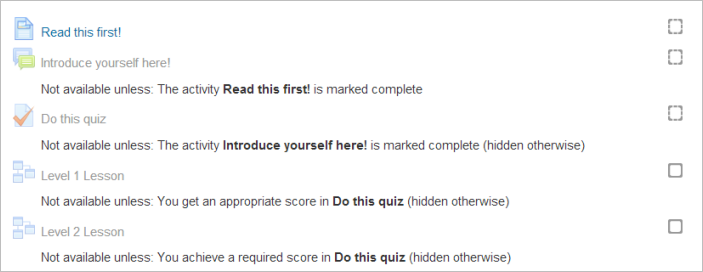
Moodle 2.0 - conditional activities
Moodle 2.0 has been a long time coming: it's been two years in development, 70% of the code has been re-written and some great new features have been added.
One of the most transformational is what they're calling 'conditional activities'. There has been a bit of debate over whether conditional activities should be added to Moodle because some believe that every student should have access to all learning activities at all times (a viewpoint that has considerable merit) but I'm in favour of conditional activities because it gives educators the ability to reconfigure the learning management system depending on the needs of the learner. In short: Moodle becomes a personalised learning environment.
Image a situation whereby a student gets 100% in the diagnostic assessment at the start of a unit of work, while another gets 20%. These two students need dramatically different pathways through the topic ahead, but traditionally they have had the same materials available to them from this point on. Using conditional activities, a teacher could say "If a student receives 80% or higher in this quiz, then reveal to them these further activities, but if a student receives 20% or lower, allow them to see these activities..." Teachers can set any criteria they like around turning these activities on or off, but used well, this has the power to put the right learning activity in front of the right learner at just the right time. I can't wait to start using them with my students...

One of the most transformational is what they're calling 'conditional activities'. There has been a bit of debate over whether conditional activities should be added to Moodle because some believe that every student should have access to all learning activities at all times (a viewpoint that has considerable merit) but I'm in favour of conditional activities because it gives educators the ability to reconfigure the learning management system depending on the needs of the learner. In short: Moodle becomes a personalised learning environment.
Image a situation whereby a student gets 100% in the diagnostic assessment at the start of a unit of work, while another gets 20%. These two students need dramatically different pathways through the topic ahead, but traditionally they have had the same materials available to them from this point on. Using conditional activities, a teacher could say "If a student receives 80% or higher in this quiz, then reveal to them these further activities, but if a student receives 20% or lower, allow them to see these activities..." Teachers can set any criteria they like around turning these activities on or off, but used well, this has the power to put the right learning activity in front of the right learner at just the right time. I can't wait to start using them with my students...
Saturday, May 8, 2010
Who wants to be a millionaire?
One of the great things about being part of the community of Moodle users (that numbered 50 million last time I checked) is the wealth of third-party add-ons available. One module I think is great is the Game module. It takes any normal quiz, glossary or questions and turns it automatically into any one of 8 games, from hangman to sudoku to something similar to 'who wants to be a millionaire'. One of my great tricks is to get students to build a glossary of key words and definitions for a topic as we go. With the quiz module, you can then turn that student-developed resource into a game that everyone can play: it's like the students build their own interactive learning tools.


Sunday, February 14, 2010
Two-minute Moodles
No it's not a typo, two-minute Moodles is a collection of screencast how-to videos put together by Tomaz Lasic. It's a really useful site for people who want a little bit of help, or who want to build their Moodle skills. Thanks Tabitha for the tip.
It's a shame these were recorded on a Windows computer (which means they can't be put into the public domain) but they're a fantastic help nevertheless. I'll be putting my staff onto them next week.
"What is Moodle" explained with Lego (full version) from Tomaz Lasic on Vimeo.
It's a shame these were recorded on a Windows computer (which means they can't be put into the public domain) but they're a fantastic help nevertheless. I'll be putting my staff onto them next week.
Monday, January 18, 2010
Sunday, September 6, 2009
Moodle and Mahara integration
This is an old post, but it's the first time I've seen a screencast of this feature in action. It's SSO between Moodle and Mahara demonstrating the function of pushing an artefact from the assignment module in Moodle through to the Mahara files area. As I see it, this is fundamental to a useable LMS/e-portfolio system. Good to see it's on its way:
Friday, April 17, 2009
Return on Investment
Ohloh.com has a great calculator for assessing the investment made into open source projects. It takes a project and analyses its code, then works out how much it would cost to pay a developer (at $55,000k/yr) to produce an equivalent project. Some of the projects took even me by surprise: got a spare US$150m? You could commission an Office suite. If your fortunes have waned a little in the recessionary times and you only US$15m sitting round, you can buy yourself a graphic manipulation project similar to Photoshop. It makes Firefox seem like a bargain at only US$840,000!!
Some of my other favourite projects are listed below:
Open Office:
Gimp:
Moodle:
Koha:
However you look at it, these numbers are a ringing endorsement of the open source model. Individuals, groups and organisations contributing a few hours (or dollars) here and there can pull together teams that dwarf most software development companies, simply by harnessing the power of community. But the great thing is that for the end user, it's all free.
Some of my other favourite projects are listed below:
Open Office:
Gimp:
Moodle:
Koha:
However you look at it, these numbers are a ringing endorsement of the open source model. Individuals, groups and organisations contributing a few hours (or dollars) here and there can pull together teams that dwarf most software development companies, simply by harnessing the power of community. But the great thing is that for the end user, it's all free.
Subscribe to:
Posts (Atom)