Showing posts with label linux. Show all posts

Wednesday, October 17, 2012

Graphics App ‘Pinta’ Updates, Brings Improved Tools, Layer Blending

Graphics App ‘Pinta’ Updates, Brings Improved Tools, Layer Blending:
A new release of graphics app Pinta has been made available for download.

Version 1.4 of the simple drawing tool sees a number of new features and improvements made, along with fixes for various bug and performance issues.


To read the rest of this article visit http://omgubuntu.co.uk

Wednesday, February 29, 2012

Three ways to do away with desktop computer

I wish computers were more portable. I wish they could easily be taken out into context and be used where learning should occur: the real world. Here are three great products that will help free us from the shackles of the desktop computer:

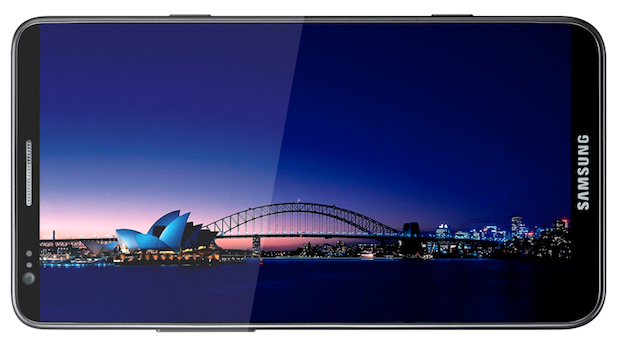
  • The new Samsung Galaxy S III is basically a full-blown computer masquerading as a phone: Quad-core processor, 1080p HD screen and so on. It's an incredible phone:
    http://www.bgr.com/2012/02/27/samsung-galaxy-s-iii-full-specs-1-5ghz-quad-core-1080p-display-ceramic-case/
  • The Raspberry Pi went on sale yesterday. It's a credit-card sized computer you can carry around with you and plug into external monitors and keyboards. This video is a great demonstration of what it can do:
  • And there are more and more of these little devices popping up all the time. "FXI is preparing to launch the Cotton Candy, a tiny computer that looks like a USB thumb drive. The device, which can run either Ubuntu or Android 4.0, has a dual-core 1.2GHz ARM Cortex-A9 CPU, 1GB of RAM, and a Mali 400MP GPU that allows it to decode high-definition video."

Tuesday, October 25, 2011

Linux Desktop Faceoff

To be honest, I'm still not 100% convinced by the new Unity interface for Ubuntu, so I was particularly interested to see this article: 'Linux Desktop Faceoff: GNOME 3 vs Ubuntu Unity'
http://lifehacker.com/5853099/linux-desktop-faceoff-gnome-3-vs-ubuntu-unity
Whatever your view, it's clear that operating systems are thundering headlong towards the tablet as the key device in coming years. Big buttons, apps and gestures, all coming your way.

Friday, August 12, 2011

Video conversion tools

My knowledge of video types and codecs has been hard-fought. I'm certainly no expert but I do know my containers from my bitrates and my framerates. Sadly it's not always easy for people to quickly resize a video or convert from one form to another without knowing more than you need to about variable bitrates or HD. To the rescue come a range of different open source video conversion tools:

  • Avidemux: gives you the best of both worlds with the ability to control bitrates, codecs, filters and so on, but also has a handy 'Auto > ' feature that automates the creation of video for things like Youtube, iPod, DVD etc.

  • Arista Transcoder:
  • The best, easiest to use transcoder I've seen. Presets take the hard work out of conversion, and there are a lot of presets.
  • PiTiVi: this is a video editor that also supports exporting to a range of different file formats. Easy to use trim feature, transitions and effects and pretty simple export at the end of the process too.

While we're at it, can I also say how impressed I am with Google's open source video codec called webm? Try it for yourself with Arista: convert a large DVD quality file to webm and see what a difference it makes. I've had file size savings of up to 90%.

Wednesday, April 6, 2011

The story of Linux video

This is a great little 'RSA animates' style video that runs through the history of Linux. A really nice exercise in reducing a complex topic to something easy to digest.
"You use linux literally every time you surf the internet. It's in your phone. It's in your TV. Running 95% of supercomputers." Bless that little penguin.

Sunday, June 27, 2010

Nice Linux ad

Wow. What a busy term. More posts to come, but in the meantime, here's some nice, open eye-candy:

The Origin... from Agustin Eguia on Vimeo.

(Thanks to cyberkiller.)

Tuesday, May 4, 2010

Ubuntu 10.04 Lucid Lynx is here

Christmas comes twice a year for Ubuntu fans. New releases come out on the 4th and 10th months of the year (hence the numbering 10.04 came out in 2010 on the 04th month. There are a number of really good new features which The Silent Number summarises here. Off the top of my head, here's what I'm thankful for this Christmas:
  • New design: the aubergine and orange theme is good. I was getting a bit sick of the yellow and brown anyway.
  • Ubuntu One is now core: 2gb of cloud-based file storage means the same files are available to me on my work laptop and desktop, home desktop and netbook. No more carrying files around on a USB stick.
  • Speed: the aim was to get a 10 second boot time. My old P4 doesn't quite get there, but it's nice to have an operating system get faster with each upgrade, not slower and more bloated.
  • Social: twitter/identi.ca, IM and chat are all rolled up into the operating system so you can keep track of all your social networking in one place. (I'm loving Gwibber as an identi.ca client too).
If you're not already running Ubuntu, download the LiveCD; it lets you load up and try Ubuntu on your existing PC without making any changes to your system. If you don't like it, pop out the CD and go back to your old system; if you do like it, double click 'Install'.

Wednesday, February 10, 2010

40 fast facts about Linux

This is a good little intro to the world of Linux. It contains some interesting facts that some people might not know, such as:
  • Linux powers 446 of the world's top 500 supercomputers.
  • Director James Cameron again chose Linux servers for box-office smash Avatar.
  • Google runs its web servers on Linux.
  • In 2009, Linux had 33.8% revenue marketshare of servers, compared to Microsoft's 7.3%

http://www.baselinemag.com/c/a/Intelligence/40-Fast-Facts-on-Linux-727574/

Wednesday, January 20, 2010

Obama AND John Key embrace open source

Never one to be left behind, John Key has followed Barack Obama into the open source world. Last year, it was announced that the Whitehouse now runs on open source CMS drupal, while recently we learnt that "Department of Prime Minister and Cabinet, Horizons Regional Council and NZ Post will all begin trialling the use of Linux desktops in February" (ZDNet). Some very nice news from the highest levels.

Saturday, November 28, 2009

2GB of free cloud back up

Good news for lovers of the cloud: Ubuntu 9.10 comes with 2GB of free cloud backup and storage! Install the client and sign up for the free account and Ubuntu One scans your files for changes and uploads any new or changed files to your cloud drive. So most of your backup problems disappear, but you can also access your files from any computer in the world. If you've got Ubuntu on your work computer and your home computer (like me), you can access the same file from two different locations. For instance, you can be working on a file at work, finish up for the day and head home. By the time you've logged on, the files have synced and you can open the same file and carry on at home. Now that's living in the cloud.

Tuesday, November 24, 2009

Chromium OS launched

Exciting times for Linux geeks. Google has open sourced its disruptive operating system Chromium. Essentially it's a lightweight operating system that contains just enough to power a browser (which is where Google sees us doing just about everything in the near future). The way Google have been able to achieve a boot time of 7 seconds is to strip out everything that is not essential to running a browsers. Anyone who's used computer before is probably familiar with the way operating systems get slower and slower over the life of the device. This is quite convenient for peddlers of locked in operating system, because it means you're more likely to pay for an upgrade, but the root cause is often sloppy programming of third party software. What often happens is that programmers put parts of their code into the boot process so that it run all the time. Why? Because if 50% of their programme is running constantly, when you actually start that programme, it appears to load faster. So the program looks like it's nice and fast, but what it's actually doing is choking your entire computer. Not good in the long run.
With Google's 7 second boot and Ubuntu's goal of a 10 second boot in its next release, it looks like speed is going to become on of Linux's hallmarks in the years to come. It may just be the tipping point for an increasingly impatient market.
More on the Chromium OS:


Tuesday, October 20, 2009

Go Uruguay!!!

This is a wonderful endorsement of a wonderful programme. This from the BBC:

Uruguay has joined the small number of nations providing a laptop for every child attending state primary school.

President Tabaré Vázquez presented the final XO model laptops to pupils at a school in Montevideo on 13 October.

Over the last two years 362,000 pupils and 18,000 teachers have been involved in the scheme.

The "Plan Ceibal" (Education Connect) project has allowed many families access to the world of computers and the internet for the first time.

http://news.bbc.co.uk/2/hi/technology/8309583.stm

Monday, August 31, 2009

Bitten by a penguin: the Windows user's guide to Linux

Two quick points:
  • Jon Jermey has written a nice little introduction to Linux, aimed at Windows users, and he's made it available for download as an e-book here. It's a really good summary of what Linux is, some of the major distributions available and why one might make the switch to one of them
  • Secondly, if you're not aware of it, Ubuntu Linux Live CDs are available here. A live CD lets you run an evaluation version of Linux without making changes to your existing system. These are really cool: pop in the CD, fire it up and have a play around. If you don't like it, eject the CD and it all goes away; if you do like it, double click install and it'll install a copy onto your computer. You can even keep your exisiting operating system (Windows or OSX) so you can choose between it and Linux. (If you don't know what a disk partition is, it might pay to ask someone who does to look over your shoulder while you install it, however.) I wondered why other software companies didn't offer a Live CD option, but then I realised that if MS had done this with Vista, no one would have bought it. Companies like Microsoft can't survive by offering people choice; they can only survive by compelling people to upgrade regularly. The need for cashflow determines the consumer's experience.

Wednesday, April 15, 2009

New features in Ubuntu 9

At Albany Senior High School, we've got 100 student desktop and 24 staff laptop computers running Ubuntu Linux. So when I saw that v9.04 (Jaunty Jackalope) was only 8 days away I had a good look at the new features. The cloud computing and turnkey mail server look quite good, and the support for external monitors looks useful as well. It feels pretty good to know that while I'm sitting on my chuff these fantastic developers are beavering away producing new features for me to use without sending me the bill.
But which new features deserve to see the light of day? If you swing by http://brainstorm.ubuntu.com/ you can see some of these new features and even participate in their development. Community members propose new features and other community member vote them either up or down. Crowdsourcing the selection process means you tap into a committed developer community full of great ideas. And somehow I trust the community to come up with better ideas than a focus group or a group of coders sitting around a table with a kushball. Swing by the brainstorm and vote for a few ideas. You never know- they may turn up in the next release!