
Showing posts with label software. Show all posts
Showing posts with label software. Show all posts
Thursday, February 23, 2012
Crocodile clips blog
I know quite a few people use the software Yenka (which used to be known as Crocodile Clips) for chemistry, electronics, physics etc. They have a useful Tumblr blog that not everyone will know about: http://crocclips.tumblr.com/


Wednesday, February 10, 2010
LCA2010: Antifeatures

One of the keynotes at LCA2010 was Ben Mako Hill. His presentation on 'Antifeatures' in software was very nicely put together and for me illustrates some of the madness that exists in proprietary software. An antifeature is something that the developer works hard to develop and include in a product that limits that product's abilities. Sometime considerable effort and expense goes into developing these antifeatures because the developers know that there will be a profit in it further down the track. The best illustration of a simple antifeature is unlisted numbers in the phonebook. Although it's much easier for a telephone company to exclude a number from a directory than include it, somehow it has transpired that in order to have your number left off the directory, it costs you money.
Mako has a long list of these antifeatures in products, and all of them were designed to exploit consumers through:
- extract money from the user.
- segmenting the market.
- creating or extending monopolies.
- protecting copyright.
Perhaps the most well-known example of the second kind of antifeature is the scam perpetrated by Microsoft around the Windows NT Workstation & Server editions. It was the same product, but by changing one digit in the registry, M$ could cripple the software so it couldn't act as a webserver.
Another good example is the Canon G7. All cameras (including the Cann G6) shoot RAW. It's simply the uncompressed 'raw' data from the camera's CCD. Canon decided that in order to push people who wanted RAW into the next price bracket, they would cripple the G7 so it would only produced compressed JPG images.
I love the word 'antifeatures'. It's a perfect label for some of the anti-consumer practices most companies engage in. Let's always remember that companies are designed to make money. Keeping customers happy is only a mean to that end. And let's take back a bit of consumer power- it's our money after all.
Wednesday, January 27, 2010
Krita
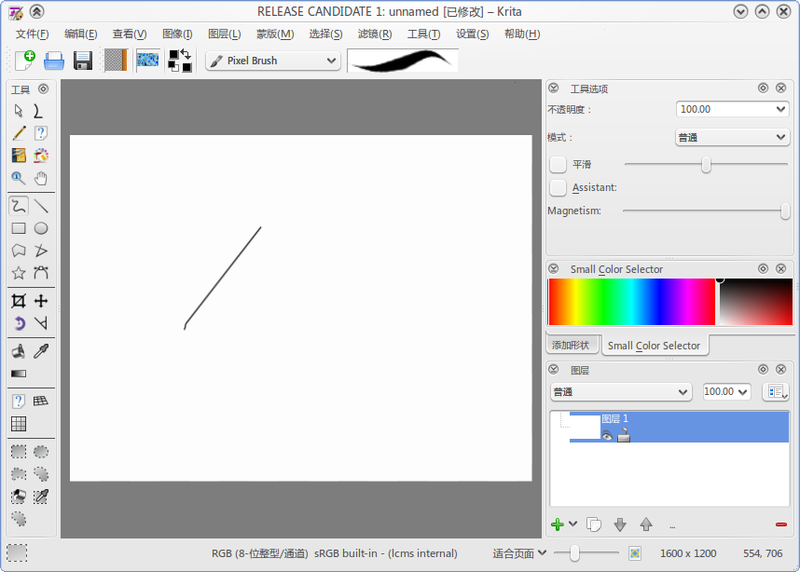 Krita is a creative application for raster images. Whether you want to create from scratch or work with existing images, Krita is for you. You can work with photos, scanned images or start for a blank slate. Krita supports most graphics tablets out of the box.
Monday, January 25, 2010
Free as in freedom, not as in beer.
Following a couple of presentations about our school at Linux.conf.au (here and here), there seems to have been an explosion of interesting in what we're doing in the open source space. Articles are being carried on CIO, Slashdot and Computerworld among others and the comments are running hot. A lot of people are interested in hardware, network, infrastructure, virtualisation, cost, return on investment and so on (which is fine) but I'd just like to make sure everyone understands why we're an open source school. And it has nothing to do with IT.
When the establishment leadership team sat down to design the information systems for the school we looked first at what we're trying to achieve; not the budget we had to achieve it. Our vision at ASHS is:
At Albany Senior High School
By the time the cost of this software licencing is applied to office suites, graphical manipulation, video editing, music composition, 3D modelling, space exploration, language learning, mind mapping, flashcards, vector graphics, animation, desktop publishing and programming software, we have a problem. The decision we faced as a school was to use proprietary software and impose a learning tax on our community or to use open source software and give everyone access to a full range of powerful, free learning tools. It's no surprise which way we went. If you're interested in the software we use, there's a summary here.
Open source software also supports the learning of our community (local and global) through an unbeatable business model. Any features we have developed for us, we contribute back to the community, meaning a dollar spent by us literally helps the whole world. If I pay a proprietary software developer to improve their product, they can then sell that to every customer they have, meaning a dollar spent by us can be used to extract another dollar from that company's other customers. They sell the feature we paid for to everyone else. It just doesn't make sense, and I think it's only a matter of time before the open source business model makes serious headway in software 'sales'.
Just to clarify this also: not all of our software is open source. We still use a couple of products that have no comparable open source equivalent (like Final Cut Pro) because the tool is the most important thing. We won't deny a student the ability to study and learn because of an ideology we have. Our ideology is to do the very best by our students, it just so happens that open source software does this most of the time.
A few posters on discussion forums have also focused on the amount of money the school has saved as a result of being open source. It's true that we save a six-figure sum each year in hardware and software costs, but this is just a handy spin-off from our decision to be open source, not the reason we did it.
It's free as in 'freedom' not free as in 'free beer'.

When the establishment leadership team sat down to design the information systems for the school we looked first at what we're trying to achieve; not the budget we had to achieve it. Our vision at ASHS is:
At Albany Senior High School
- we nurture each other
- we inspire each other
- we empower each other
to achieve highly and become good citizens.
In addition to the vision, we have 11 values which include:
- Families as part of our learning community.
- Fairness, openess, honesty and trust.
- Learning together and making decisions together.
- Curiosity and enquiry, creativity and innovation.
- Contributing to our local and global communities.
- Diversity that enriches our learning community.
By the time the cost of this software licencing is applied to office suites, graphical manipulation, video editing, music composition, 3D modelling, space exploration, language learning, mind mapping, flashcards, vector graphics, animation, desktop publishing and programming software, we have a problem. The decision we faced as a school was to use proprietary software and impose a learning tax on our community or to use open source software and give everyone access to a full range of powerful, free learning tools. It's no surprise which way we went. If you're interested in the software we use, there's a summary here.
Open source software also supports the learning of our community (local and global) through an unbeatable business model. Any features we have developed for us, we contribute back to the community, meaning a dollar spent by us literally helps the whole world. If I pay a proprietary software developer to improve their product, they can then sell that to every customer they have, meaning a dollar spent by us can be used to extract another dollar from that company's other customers. They sell the feature we paid for to everyone else. It just doesn't make sense, and I think it's only a matter of time before the open source business model makes serious headway in software 'sales'.
Just to clarify this also: not all of our software is open source. We still use a couple of products that have no comparable open source equivalent (like Final Cut Pro) because the tool is the most important thing. We won't deny a student the ability to study and learn because of an ideology we have. Our ideology is to do the very best by our students, it just so happens that open source software does this most of the time.
A few posters on discussion forums have also focused on the amount of money the school has saved as a result of being open source. It's true that we save a six-figure sum each year in hardware and software costs, but this is just a handy spin-off from our decision to be open source, not the reason we did it.
It's free as in 'freedom' not free as in 'free beer'.

Friday, January 22, 2010
Koha 3.2 : The next step
We're about to implement two exciting features in our library: RFID and self-check. It's not common for school libraries to use RFID, but as the cost comes down and there is more support for what it can do I'm sure it'll become increasingly popular. Once you make the transition from a 'dumb' tattle-tape security system to and RFID system, you can have a lot more fun with your items. One of the projects I'm hoping to get students involved in this year is to integrate an RFID reader, Koha and a touchscreen so students can walk up to a screen, place a book in front of it and have Koha pull up reviews of that item or recommendations based on that title.
When our Librarian and I started talking about self-check, my first thought was 'Oh... I wonder if Koha can support it?' I hadn't heard anything on the lists about it so I was prepared to start looking for some developer funding, but sure enough, it's one of the features Koha has that isn't widely known.
Below is Jo Ransom and Chris Cormack's presentation on Koha 3.2, due out in the next little while. I'm really looking forward to the upgrade: there are a whole lot of new features including enhancements to the federated search feature in Koha.
When our Librarian and I started talking about self-check, my first thought was 'Oh... I wonder if Koha can support it?' I hadn't heard anything on the lists about it so I was prepared to start looking for some developer funding, but sure enough, it's one of the features Koha has that isn't widely known.
Below is Jo Ransom and Chris Cormack's presentation on Koha 3.2, due out in the next little while. I'm really looking forward to the upgrade: there are a whole lot of new features including enhancements to the federated search feature in Koha.
Koha 3.2 : The next step
View more presentations from jransom.
Monday, January 18, 2010
Wednesday, September 2, 2009
So what software do you use?
We have 100 student desktop computers running Ubuntu 8.10. Each machine has the following software installed:
Office:
Office:
- Open Office
- Freemind
- Planner (Project Management)
- Stellarium
- GBrainy
- KSeg (Geometry sketchpad)
- Graphics:
- Blender 3D
- Gimp
- Inkspace
- Ocular
- Scribus
- Amarok
- Audacity
- Avidemux
- Recordmydesktop
- Kdenlive
- Kino
- Pitivi
- LMMS
- NtEd
- QSynth
- VLC
- Rosegarden
- Rhythmbox
- Frescobaldi
- Gambas
- Bluefish
- Eclipse
- Alien Arena
- Battle for Wesnoth
- Flightgear
- Frets on Fire
- Nexuiz
- Torcs
- Warsow
- Glest
Thursday, April 23, 2009
Open source up; locked in down
I was recently passed this really interesting survey Forrester Consulting has carried out. It found that 81% of enterprises have already deployed open source desktop/productivity software or are planning to with 12 months.
See the full report here.
Another report caught my eye, this one noting:
See the full report here.
Another report caught my eye, this one noting:
- More than 72 percent of those surveyed are either actively evaluating or have already decided to increase their adoption of Linux on the server in 2009, with more than 68 percent making the same claim for the desktop;
- The recession is forcing many IT buyers to re-evaluate purchasing strategies in order to save costs, with open source increasingly getting the nod. IDC found that the recession is driving even more adoption of Linux, and new Forrester data suggests that cost savings will help open source well beyond Linux."
Friday, April 17, 2009
Return on Investment
Ohloh.com has a great calculator for assessing the investment made into open source projects. It takes a project and analyses its code, then works out how much it would cost to pay a developer (at $55,000k/yr) to produce an equivalent project. Some of the projects took even me by surprise: got a spare US$150m? You could commission an Office suite. If your fortunes have waned a little in the recessionary times and you only US$15m sitting round, you can buy yourself a graphic manipulation project similar to Photoshop. It makes Firefox seem like a bargain at only US$840,000!!
Some of my other favourite projects are listed below:
Open Office:
Gimp:
Moodle:
Koha:
However you look at it, these numbers are a ringing endorsement of the open source model. Individuals, groups and organisations contributing a few hours (or dollars) here and there can pull together teams that dwarf most software development companies, simply by harnessing the power of community. But the great thing is that for the end user, it's all free.
Some of my other favourite projects are listed below:
Open Office:
Gimp:
Moodle:
Koha:
However you look at it, these numbers are a ringing endorsement of the open source model. Individuals, groups and organisations contributing a few hours (or dollars) here and there can pull together teams that dwarf most software development companies, simply by harnessing the power of community. But the great thing is that for the end user, it's all free.
Wednesday, April 15, 2009
New features in Ubuntu 9
At Albany Senior High School, we've got 100 student desktop and 24 staff laptop computers running Ubuntu Linux. So when I saw that v9.04 (Jaunty Jackalope) was only 8 days away I had a good look at the new features. The cloud computing and turnkey mail server look quite good, and the support for external monitors looks useful as well. It feels pretty good to know that while I'm sitting on my chuff these fantastic developers are beavering away producing new features for me to use without sending me the bill.
But which new features deserve to see the light of day? If you swing by http://brainstorm.ubuntu.com/ you can see some of these new features and even participate in their development. Community members propose new features and other community member vote them either up or down. Crowdsourcing the selection process means you tap into a committed developer community full of great ideas. And somehow I trust the community to come up with better ideas than a focus group or a group of coders sitting around a table with a kushball. Swing by the brainstorm and vote for a few ideas. You never know- they may turn up in the next release!

But which new features deserve to see the light of day? If you swing by http://brainstorm.ubuntu.com/ you can see some of these new features and even participate in their development. Community members propose new features and other community member vote them either up or down. Crowdsourcing the selection process means you tap into a committed developer community full of great ideas. And somehow I trust the community to come up with better ideas than a focus group or a group of coders sitting around a table with a kushball. Swing by the brainstorm and vote for a few ideas. You never know- they may turn up in the next release!

Koha and 5 star ratings

Our developer Mason James has just finished a prototype for a 5-star rating system for our Koha installation. At the moment it's only available on the testing site but it's looking really good. Patrons can log in, search for an item, rate it (on the search results or details page) and share those ratings with others.
I'm thinking that if we can get students to log in to rate an item, we're close to getting them to log in and write reviews, renew books, tag items etc. There's also a deeper goal here: if students see other students rating and making reading recommendations, it's the ultimate way to create a culture that promotes literacy and reading.
Edit: this feature is being contributed to Koha 3.2 along with our reading recommendation engine.
Subscribe to:
Posts (Atom)