Showing posts with label programming. Show all posts

Wednesday, November 6, 2013

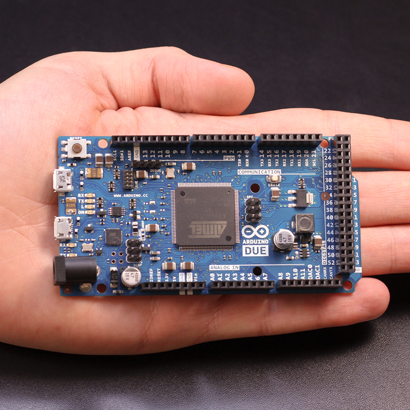
Arduino | open source programming and micro-controller

"Arduino is an open-source electronics prototyping platform based on flexible, easy-to-use hardware and software. It's intended for artists, designers, hobbyists and anyone interested in creating interactive objects or environments. Arduino can sense the environment by receiving input from a variety of sensors and can affect its surroundings by controlling lights, motors, and other actuators. The microcontroller on the board is programmed using the Arduino programming language (based on Wiring) and the Arduino development environment (based on Processing). Arduino projects can be stand-alone or they can communicate with software running on a computer (e.g. Flash, Processing, MaxMSP)."

(Link)

Sunday, July 1, 2012

Your imagination + Arduino = Anything

Here's Massimo Banzi's TED talk on Arduinos. It's a wonderful talk for anyone who has an imagination and a desire to do cool things with technology.

Some of the projects he mentions are:

  • An RFID-powered cat feeder to make sure Fido doesn't eat Felix's food.
  • A quadcopter powered by Arduino
  • A TV that mutes itself when Kim Kardasian comes on.
  • New musical instruments
  • A glove that interprets sign-language and prints the message the signer is signing.
  • A PS3 interface that allows children with limited movement to play games
  • Plants that tweet, and even...
  • A chair that tweet when someone farts.


Description:
"Massimo Banzi helped invent the Arduino, a tiny, easy-to-use open-source microcontroller that's inspired thousands of people around the world to make the coolest things they can imagine -- from toys to satellite gear. Because, as he says, "You don't need anyone's permission to make something great." "

Thursday, December 22, 2011

EDvent Calendar: Day 23 (Game Design Goodies)

Unleash the entrepreneur in your students. If you've ever played Angry Birds, or even heard how much money the developers make each month, you can see that game design is an incredible rewarding career (in every sense). For students who show promise in programming, here are three good open source engines to get them building games relatively easily.

1. Spring RTS "Spring is a project to create the best RTS engine ever (no joke). There are three principle goals which we hope to achieve:
  • Build a flexible and powerful 3D RTS engine that can handle large numbers of units and state-of-the-art special effects and animation.
  • Support new games and maps with powerful built-in Lua language support that allows game designers to realize their goals and develop better and better games.
  • Support end-users, fix bugs and provide the best support we can."


    Stencyl
2. "StencylWorks isn't your average game creation software; it's a gorgeous, intuitive toolset that accelerates your workflow and then gets out of the way. We take care of the essentials like physics and native APIs so you can focus on what's important—making your game yours."

3. http://unity3d.com/ is an editor and engine that lets you author for desktop, web or mobile and has nice features such as an asset gallery/store built in.
Unity 3D

Friday, December 9, 2011

EDvent Calendar: Day 10 (Your kids can code)

Five awesome tools to teach youngsters the basics of programming:
  • http://scratch.mit.edu/ Scratch is a programming language that makes it easy to create your own interactive stories, animations, games, music, and art -- and share your creations on the web. As young people create and share Scratch projects, they learn important mathematical and computational ideas, while also learning to think creatively, reason systematically, and work collaboratively.
  • http://www.appinventorbeta.com/about/ Creating an App Inventor app begins in your browser, where you design how the app will look. Then, like fitting together puzzle pieces, you set your app's behavior. All the while, through a live connection between your computer and your phone, your app appears on your phone.
  • http://www.alice.org/ Alice is an innovative 3D programming environment that makes it easy to create an animation for telling a story, playing an interactive game, or a video to share on the web. Alice is a freely available teaching tool designed to be a student's first exposure to object-oriented programming. It allows students to learn fundamental programming concepts in the context of creating animated movies and simple video games. In Alice, 3-D objects (e.g., people, animals, and vehicles) populate a virtual world and students create a program to animate the objects.
  • http://www.codecademy.com/#!/exercises/0 "Codecademy was created out of the frustrations Zach and Ryan felt with learning how to program. Tired with less effective text and video resources, Ryan and Zach teamed up to create Codecademy, a better, more interactive way to learn programming by actually coding. This is just the beginning. Join us as we make it easy for everyone to love and learn how to code."
  • http://hackety-hack.com/ Hackety Hack will teach you the absolute basics of programming from the ground up. No previous programming experience is needed! With Hackety Hack, you'll learn the Ruby programming language. Ruby is used for all kinds of programs, including desktop applications and websites. 
(This post's title references one of the best sources around for kid-friendly programming tools. Follow @mykidcancode on Twitter if teaching programming is something that interests you.)