Monday, August 22, 2011

Sharing is caring

One of the best things about using open source software at our school is how much it allows us to include students in development. Students built our digital signage system, our video server, our computer power saver system and our social bookmarking site.
When Yahoo said it was going to close Delicious.com I thought two things: i) I could almost hear the howls of outrage across the web, and ii) thankfully my own bookmarks are stored on a system not controlled by a corporation.
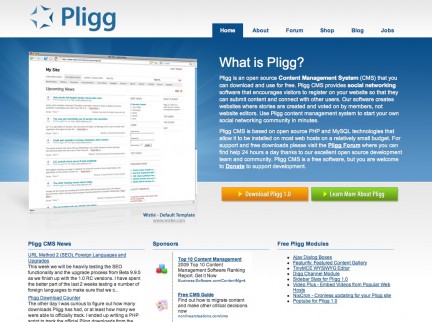
We use an open source social bookmarking platform called Pligg that was put together for us by, you guessed it, three of our students. It's hooked into our SAML single sign-on server and provisions new user automatically so there's no on-going maintenance. It supports tagging (as you would imagine), friends, groups, RSS feeds and loads other other features one would expect from social bookmarking. Here's a link to a collection of sites related to one of the topics I teach: The Merchant of Venice.

Wednesday, August 17, 2011

QR Code Craziness

After a few exchanges on the MLE discussion group, I kicked myself into action to explore something I've been meaning to play with for a while: QR codes. I've been aware of them for a while, but a few exciting things have crossed my radar recently that have opened my eyes some of the possibilities they hold for learning. The first was this video about Tesco's homestore set up in a Korean subway. Commuters, too busy to visit the supermarket, can scan the QR code of a product on a billboard and have that product delivered to their home.


Cool stuff eh? So I got to thinking, why don't we do the same thing for our school? Instead of QR codes for food and household items, why don't we link the code to apps related to learning in the Android Market? Y'know, nourish the brain rather than our desires to eat processed food? I threw a few screenshots and QR codes into Gimp and knocked up this poster which is now on noticeboards around the school:

Students can scan the code of an app they like (algebra quiz, Spanish vocab, periodic table, e-portfolio uploader etc.) and be taken directly to the market so they can download it. It's difficult to make out, but down at the bottom of the page is a QR code to connect to the school wireless. Scanning the code connects a user to the wireless network (including a password if necessary) and opens a browser and prompts them to enter their username and password before heading out to the internet. QR code craziness!

More useful resources:
Edit:
For the people who have been asking for it, here's the youtube video of the poster in action:

Tuesday, August 16, 2011

Six steps to rock and roll greatness*

  • Find a phone, and piece of paper and a marker pen.
  • Take the marker pen and draw a keyboard on the piece of paper.
  • Position the phone so the camera can see your keyboard.
  • Turn on the Piano Reality AR app
  • Bang out a melody on your portable, paper piano.
  • Practice dodging the paparazzi.

*May require some talent.

Friday, August 12, 2011

Video conversion tools

My knowledge of video types and codecs has been hard-fought. I'm certainly no expert but I do know my containers from my bitrates and my framerates. Sadly it's not always easy for people to quickly resize a video or convert from one form to another without knowing more than you need to about variable bitrates or HD. To the rescue come a range of different open source video conversion tools:

  • Avidemux: gives you the best of both worlds with the ability to control bitrates, codecs, filters and so on, but also has a handy 'Auto > ' feature that automates the creation of video for things like Youtube, iPod, DVD etc.

  • Arista Transcoder:
  • The best, easiest to use transcoder I've seen. Presets take the hard work out of conversion, and there are a lot of presets.
  • PiTiVi: this is a video editor that also supports exporting to a range of different file formats. Easy to use trim feature, transitions and effects and pretty simple export at the end of the process too.

While we're at it, can I also say how impressed I am with Google's open source video codec called webm? Try it for yourself with Arista: convert a large DVD quality file to webm and see what a difference it makes. I've had file size savings of up to 90%.

Saturday, August 6, 2011

Open Source Physics: Tracker

I discovered this neat tool when learning about the physics of Angry Birds. Not only does Tracker identify and track objects frame-by-frame through a video, it also records and graphs this data for you. It comes with quite a few experiments installed and, in the hands of a good Physics teacher, would form the centre of a very interactive unit on motion and movement. I can imagine students the world around grabbing their cellphones to record video of all manner of objects 'bouncing'. Hmmm. Does my glass of chocolate milk fall at the same rate as a bowl of noodles?
It's an easy-to-use tool that allows students to become better askers of questions and designers of experiments instead of becoming better memorisers of someone else's data.

Saturday, July 30, 2011

World Wind: Open Source Google Earth?


World Wind is by no means as full-featured as Google Earth, but if you just want to play Atlas and spin the world around, it's a good option. To install under Linux, look for worldwind in the software channels, but the java version of the software runs on any platform. Best thing about it is that the software is open source and the imagery is not owned and copyrighted by [insert giant corporation here]. There are some nice Java webstart demos here too: http://worldwind.arc.nasa.gov/java/demos/ showing things like loading .kml files, mapping elevations, annotations, geo-mapped photos, earthquake information etc.

Sunday, July 24, 2011

Hold the world in the palm of your hand

One of the winners at last year's New Zealand Open Source Awards was Ghosts in the Form of Gifts by Bronwyn Holloway-Smith.
This project used Open Source machines - the RepRap - to recreate physical artefacts from Te Papa that had been lost or destroyed over the years. The finished files for the artefacts were released under a Creative Commons licence so that anyone who wished to could create their own exhibits. Most of these represented items of significance to Pacific cultures.

Wouldn't it be great to be able to use public domain 3D models like these with students wherever and whenever we liked? Of course. Enter AndAR, which stands for Android Augmented Reality. This app allows anyone with an Android phone to download 3D model files and, using a black and white printed marker, use Augmented Reality to view and interact with those models. It's hard to explain just how it works, so here's a video, using one of the stock 3D models that come with the app:
See what I mean?
And as Bronwyn has very thoughtfully made her models available under a CC-BY-SA licence, anyone can download a copy of a file and use it within AndAR. So if you need to play around with an adze, a sperm whale tooth or even a giant land snail shell, now you can.